 Inklatch
Steps
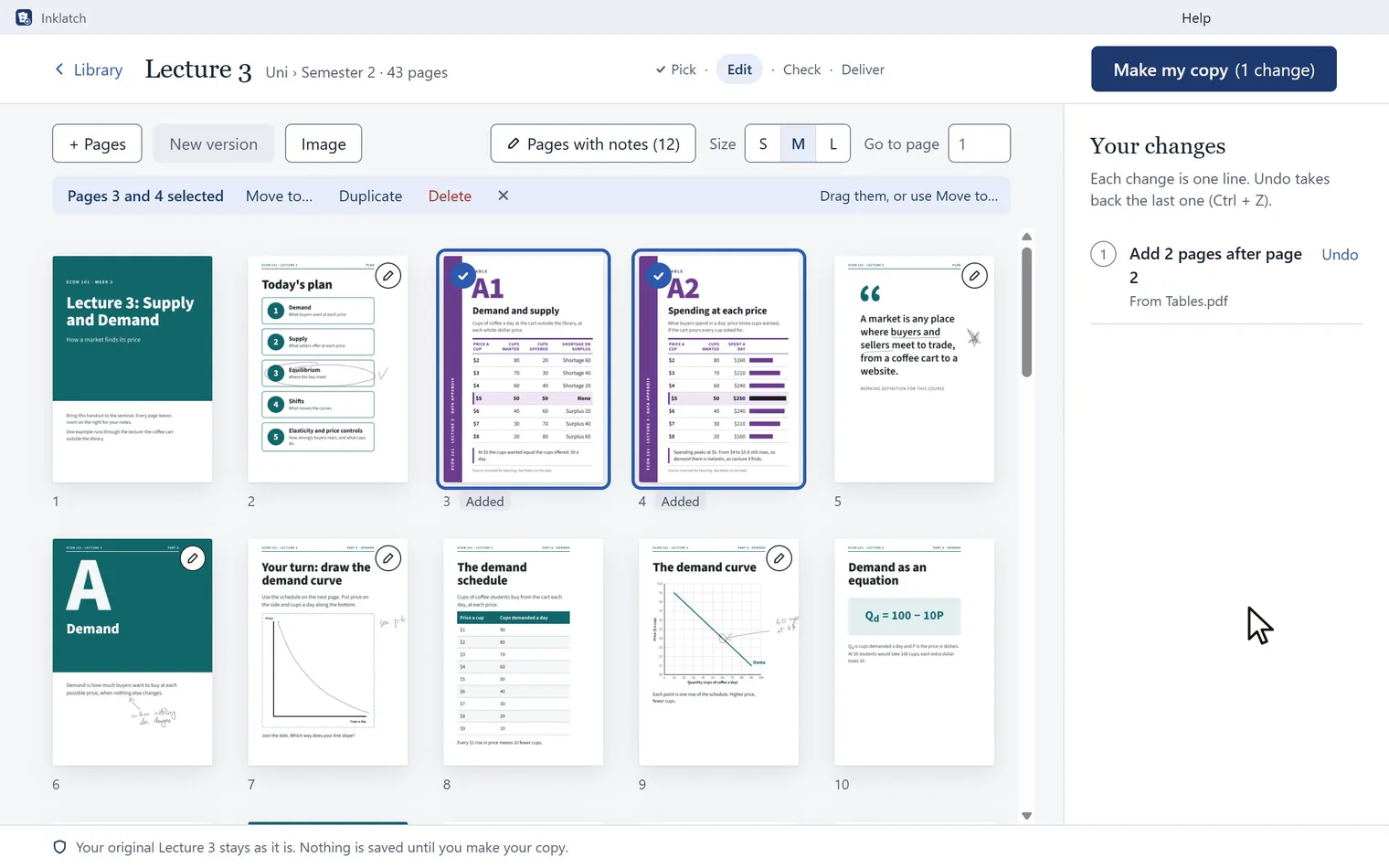
- Make a change, for example add 2 pages from Tables.pdf after page 2 of Lecture 3.A new line in Your changes, on the right, with Undo beside it.
- Press Ctrl+Z (Cmd+Z on a Mac), or click Undo on the line.The two pages are gone. The line stays, crossed off, with Redo beside it.
- To bring it back, press Ctrl+Y (Cmd+Y on a Mac), or click Redo.The pages are back, and the line is no longer crossed off.
- To undo more, undo again. Each undo takes back the last line still in force.
Your changes
- Each change is one numbered line, in the order you made it. Undo takes them off in the opposite order. With none yet, the panel says "No changes yet. Each edit you make shows up here as one line."
- An undone line is crossed off, with "Undone. Redo brings it back." under it.
- Only the last line in force has Undo. Only the first crossed-off line has Redo: it's the next one to come back.
- Page numbers in a line are as they were just before that change. They don't change afterward.
- Making a new change removes the crossed-off lines for good.
- Crossed-off lines aren't counted on the Make my copy button and aren't in your copy. With every line crossed off, the button says "Make a change first".
- Nothing changes your document while you edit. Your copy is made only when you click Make my copy.
Without a mouse
- Ctrl+Z undoes (Cmd+Z on a Mac).
- Ctrl+Y or Ctrl+Shift+Z redoes (Cmd+Y or Cmd+Shift+Z on a Mac).
- In the Go to page box, these keys undo your typing in the box, not your changes. The same goes for the page number box when you place pages.
Other ways
- After you move or delete pages, or add pages from a PDF, a short message shows for a few seconds with Undo. It shows only while that change is still the last one.
- While an image's page is open, Remove image is the same as undo for that image. It works only while that image is your last change.
If something else happens
- "Discard your changes to Lecture 3?"
- You're leaving the document with changes in force. That happens when you click Library, press Esc on the pages with nothing selected, open another document from outside Inklatch, or close the window. Click Keep editing to stay, or press Enter or Esc. Discard changes leaves, and every line is lost. Your original stays as it is either way. Changes aren't kept when Inklatch closes, so make your copy first.
- Undo or redo does nothing
- The keys do nothing while Help, About or one of the app's messages is open. Close it and try again. On the Check screen, Ctrl+Z (Cmd+Z on a Mac) takes back only the choices you made there, and there's no redo. If every line is crossed off, there's nothing left to undo. With no crossed-off line, there's nothing to redo.
- A line says "No longer fits the document."
- When you made your copy, this change no longer fit the document. Undo until that line is crossed off, then make your copy again.
- New version opens a file window, not the Check screen
- You undid the line "Use the new version" after going back with Edit pages. With that line crossed off, New version asks for a PDF again. To get your new version back, click Redo instead: then New version opens the Check screen again.
Next: Make my copy, to build your new copy and test it.