 Inklatch
Why your notes don’t follow the new PDF
On a reMarkable, your handwriting is kept apart from the PDF, page by page, and tied to that one document. The PDF is the paper. Your notes sit on top.
When a new version arrives, say Lecture 3 v2.pdf, the tablet sees a new document. It starts with clean pages. Your notes stay on the old one.
Exporting doesn’t solve it either. An exported PDF has your notes drawn into the page. Put it back on the tablet and they’re part of the picture: you can’t move or erase them, and they still sit on the old text.
Your options
Four ways people handle it, simplest first.
Keep both versions
Free · nothing to install
Your notes stay on the old document, and you read the new one beside it. Fine when only a page or two changed.
Effort low
Copy your notes by hand
Free
Rewrite what matters on the new version. Good for a few pages, slow for many, and easy to miss one.
Effort high
Export and stitch
Free tools · a PDF editor
Export the old version with notes, then swap in the new pages you need. Your notes become part of the page: they can’t be edited, and they stay with the old wording.
Effort medium
Use Inklatch
$19 once · Windows and Mac
A desktop app that puts the new PDF under your notes, page by page, and shows you what changed before you save.
Effort low
| Notes you can still erase or edit | Notes move to the new version | Effort | Cost | |
|---|---|---|---|---|
| Keep both versions | Yes | No, they stay on the old one | Low | Free |
| Copy by hand | Yes, you rewrite them | Yes, by hand | High | Free |
| Export and stitch | No, they become part of the page | Only on old pages you keep | Medium | Free |
| Inklatch | Yes | Yes, on the matching new page | Low | $19 once |
With Inklatch
- Let the reMarkable desktop app finish syncing, so your newest notes come along.
- Drag the new PDF onto your document in Inklatch, and choose New version.
- Check the changed pages. A summary lists what changed, page by page. Click any page to see it before and after, with your notes.
- Click Make my copy, then drag the copy into the reMarkable desktop app. It syncs to your tablet.
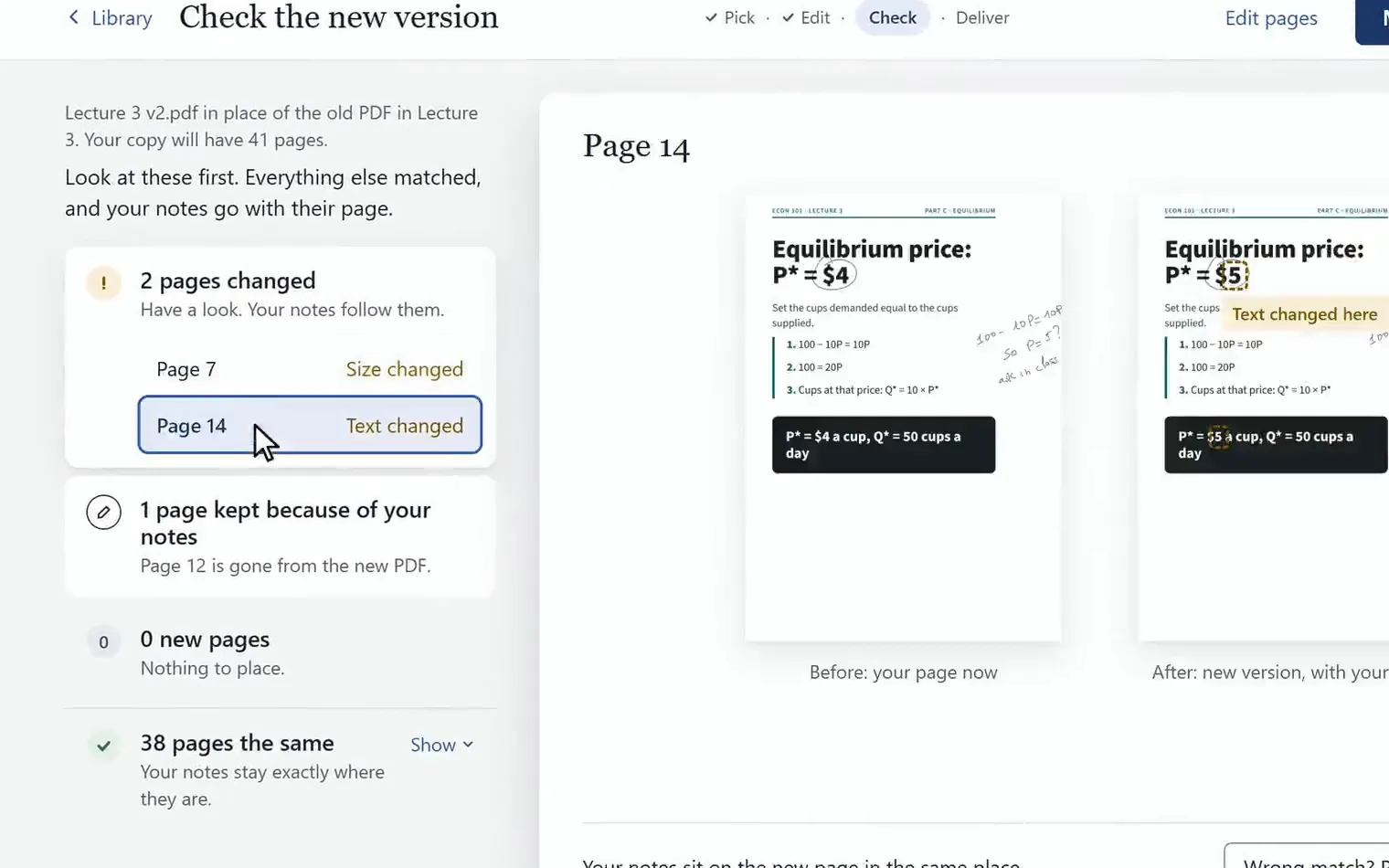
What the summary tells you, in the app’s own words:
| Line | What happens to your notes |
|---|---|
| “2 pages changed” | They go on the new page, in the same place. |
| “1 page kept because of your notes” | The page is gone from the new PDF, so the old page stays, notes and all. |
| “0 new pages” | New pages arrive with no notes yet. |
| “38 pages the same” | Nothing moves. |
Your original document stays as it is. Inklatch makes a new copy and tests it before it’s saved. It works with the reMarkable desktop app on your computer, and never connects to the reMarkable cloud.
What to watch for
- It compares words and page size, not pictures. If a chart or a stamp changed but the words didn’t, the page counts as the same. For contracts and forms, open every page that matters.
- A page that changed size can leave your notes a little off. Inklatch never moves or scales them. You can keep the old page instead.
- Pages that moved are matched in order, so one may show as kept or gone. Pair it by hand before you save: open the page and click “Wrong match? Pair with another page…”.
- Scans are compared by a small picture of the page, not by words. Look at every pair before you save.
Questions people ask
Can reMarkable replace a PDF and keep my notes?
Not as of November 2026. A new PDF arrives as a new document, without your handwriting.
What happens to a page with notes that’s gone from the new version?
Inklatch keeps the old page, with its notes, in its place. You can remove it if you don’t need it.
Will my notes still be editable on the tablet?
Yes. Inklatch copies your handwriting as it is, so you can still move, erase or add to it.
Does Inklatch change my original document?
No. It always makes a new copy, and your original stays in the reMarkable app as it was.