 Inklatch
Why the tablet can’t do it on its own
On a reMarkable, your handwriting is stored page by page and tied to one document. The tablet can add a blank page to that document for more notes. It can’t bring in a page from another file.
So people join the two PDFs on a computer first. Say you want two pages of Tables.pdf after page 2 of Lecture 3. The joined file is a new document to the tablet. It starts with clean pages, and your notes stay on the old Lecture 3.
Exporting with your notes doesn’t fix it. The exported PDF has your notes drawn into each page. Bring it back, and they’re part of the picture: you can’t erase or move them.
Your options
Five ways people handle it, simplest first.
Keep two documents
Free · nothing to install
Import Tables.pdf as its own document and flip between the two. Fine for pages you only need to read.
Effort low
Capture the part you need
Free · on the tablet, software 3.28 or later
The Capture tool copies part of a page as a picture, such as one table. You paste it into your notes. It’s a picture, not a page, so you can’t edit what’s in it.
Effort medium
Join the PDFs and start again
Free · any PDF editor
Join them on a computer and import the result. The pages are in the right place, but none of your notes come along. Best before you’ve written anything.
Effort low
Export, join and import
Free tools · a PDF editor
Export Lecture 3 with your notes, join in the new pages, and import the result. Your notes come along as part of the page, so you can’t erase or change them.
Effort medium
Use Inklatch
$19 once · Windows and Mac
A desktop app that puts the new pages between yours, in a copy of your document. Your notes stay on their own pages, and you can still erase them.
Effort low
| All pages in one document | Notes you can still erase or edit | Effort | Cost | |
|---|---|---|---|---|
| Keep two documents | No, two documents | Yes | Low | Free |
| Capture part of a page | No, a picture of part of a page | Yes | Medium | Free |
| Join and start again | Yes | No, they stay on the old document | Low | Free |
| Export, join and import | Yes | No, they become part of the page | Medium | Free |
| Inklatch | Yes | Yes | Low | $19 once |
With Inklatch
- Open your document in Inklatch, for example Lecture 3.
- Drag the other PDF onto the pages, or click + Pages, then From a PDF. Its pages open on the left. Nothing is added yet.
- Tick the pages you want. Click the + between two of your pages, then Add here.
- Click Make my copy, then drag the copy into the reMarkable desktop app. It syncs to your tablet.
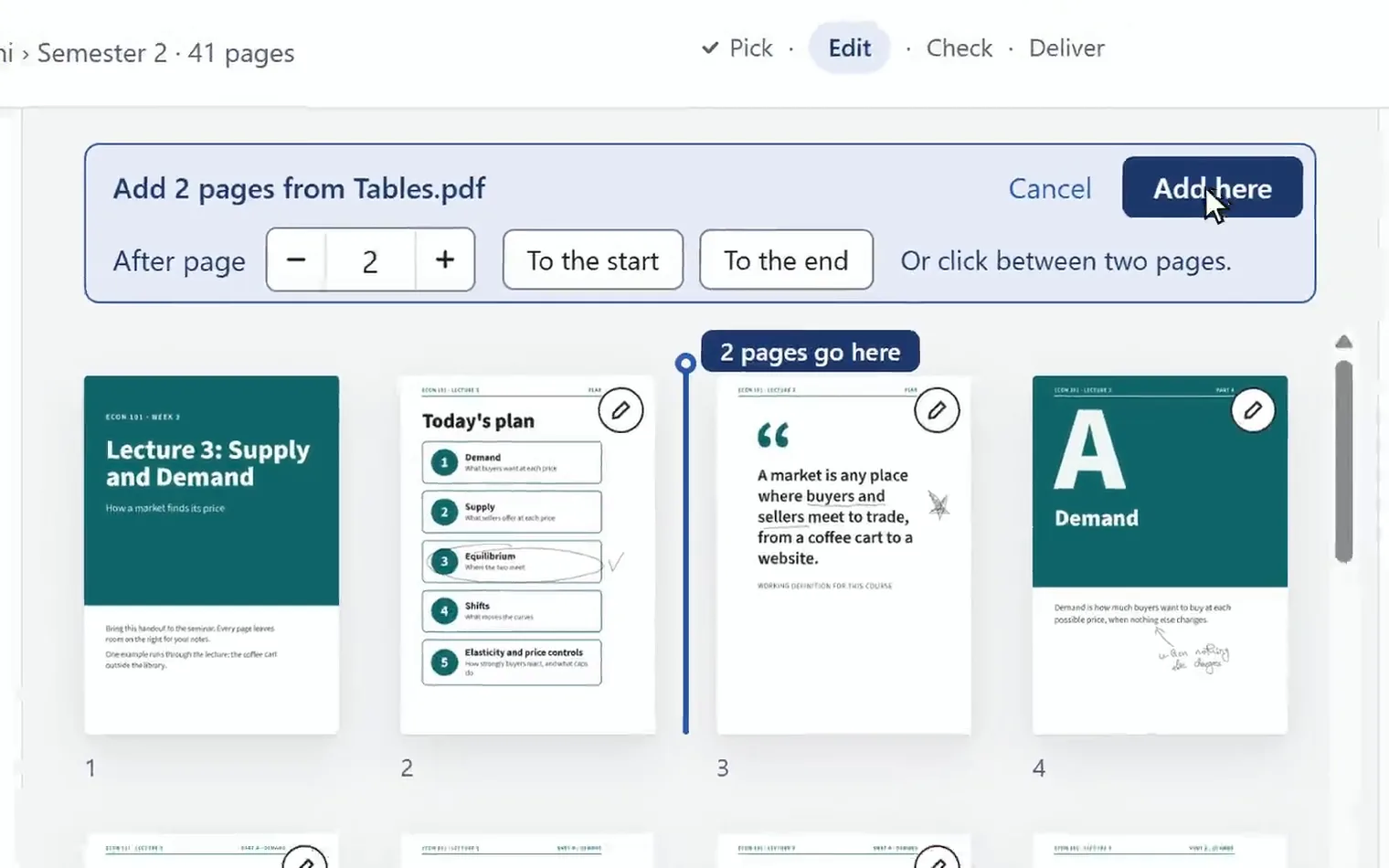
What happens to your pages, when you add 2 pages after page 2:
| Pages | In your copy |
|---|---|
| Pages 1 and 2 | Stay where they are, with their notes. |
| The 2 new pages | Become pages 3 and 4, tagged “Added”, with no notes yet. You write on them on the tablet like any other page. |
| Your old pages 3 to 7 | Become pages 5 to 9, each with its notes. |
Your original document stays as it is. Inklatch makes a new copy and checks it before it’s saved. It works with the reMarkable desktop app on your computer, and never connects to the reMarkable cloud.
What to watch for
- Sync first. Inklatch works from the copy on your computer. Let the reMarkable desktop app finish syncing, so your newest notes come along.
- Your copy is a new document. Notes you write on the old one later won’t be in it. When the copy arrives, Inklatch shows you how to delete the old one, or you can keep both.
- Each new page keeps its own size. A US Letter page stays US Letter in an A4 document.
- PDF documents only. Notebooks and EPUBs aren’t listed in Inklatch.
Questions people ask
Can I add pages from another PDF on the reMarkable itself?
Not as of November 2026. You can add blank pages to a document. The Capture tool can copy part of another page as a picture, but not a whole page.
Will my notes end up on the wrong page?
No. Each page keeps its own notes. Add 2 pages after page 2, and your old page 3 becomes page 5, notes and all.
Can I write on the new pages?
Yes. On the tablet they’re pages like any other.
Can I add pages from another reMarkable document, with its notes?
Yes. In Inklatch, click + Pages, then Another reMarkable document. Each page you tick brings its own notes.
Does Inklatch change my original document?
No. It always makes a new copy, and your original stays as it was.